|
|
Paradyne 6211 Bridge/Router Combo
DHCP Configuration
The Paradyne 6211 bridge/router combo is a bridge and router in one. This device is preferred by many due to it's low cost and compact size. To setup your Paradyne router for DSL connectivity follow the instructions below or call VCI at (270) 442-0060 or (800) 755-1239
- Log into your 6211's management interface. This is normally done by going to http://192.168.1.1 in your web browser. The default username is "Admin" and the password is "Admin"
- Click Setup across the top. Place a check in "Enable Firewall and NAT Services", click Apply at the bottom.
- Login again after the router reboots.
- Click Setup across the top.
- Click "WAN Bridge" on the left. Click Delete at the bottom.
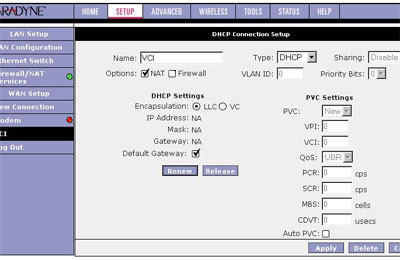
- Click "New Connection" on the left and set the following options:
- Name: VCI
- Uncheck Firewall (without this DHCP will not work)
- Change Type to DHCP.
- Place a check in "Default Gateway"
- Click Apply at the bottom.
- If you will not be using the Wireless AP disable the wireless functionality for security reasons. Click Wireless across the top, then Configuration and remove the check from "Enable AP". Click Apply
- To save these settings click Tools across the top, "System Commands" and then "Save All"
|